Licensed master electrician · Call 414-207-0109
A smart switch usually drops offline because of its Wi-Fi connection or its wiring, not because the switch is broken. The two causes we look at first are a weak or crowded 2.4 GHz signal reaching the wall box, and a missing or shared neutral wire that leaves the switch without the steady trickle of power it needs to stay connected. Fix the signal or fix the wiring, and most switches stop disconnecting.
Smart switches live in a metal or plastic box inside a wall, behind a cover plate, often on an exterior wall or in a hallway far from the router. That is a hard place to hold a radio signal. Most smart switches also use the 2.4 GHz Wi-Fi band only, which travels further than 5 GHz but is noisier and more crowded.
On top of that, a smart switch is never fully off. Even when the light is off, the switch itself has to stay powered so it can listen for commands. It draws that small amount of power through the neutral wire, the white conductor that completes the circuit back to the panel. Older boxes in Milwaukee and Waukesha County homes very often do not have a neutral in the switch box, because the original installer only ran the hot wire through the switch loop. A switch installed without a proper neutral may work for a while, then drop offline, flicker, or behave unpredictably as bulbs and loads change.
So the pattern of the dropouts tells you a lot. Random disconnects that come back on their own point toward signal. Dropouts that follow a specific room, a specific light, or that started the day the switch went in point toward wiring.
What is usually causing it
Here are the causes we work through, roughly in the order they turn up on a service call.
Weak 2.4 GHz signal at the wall box. Your phone may show full bars standing in the room, but the phone is not inside a wall box behind a metal plate. Plaster, lath, foil-backed insulation, and metal boxes all cut signal. A switch sitting at the edge of usable range will connect, work, then drop.
A crowded channel. In denser neighborhoods, a dozen networks can share the same 2.4 GHz channel. The switch is competing for airtime with every neighbor and every smart device you own.
No neutral, or a borrowed neutral. Some smart switches are sold as no-neutral models and pass a tiny current through the bulb instead. That can work, but it is fussy. With LED bulbs, which draw very little, the result is often ghost flickering, a switch that reboots, or a device that keeps dropping off the network.
Three-way and multi-location switching done wrong. If two switches control one light, the smart switch has to be the one that gets constant power, and the companion switch has to be the right matching part. Mismatched pairs are a frequent source of intermittent behavior.
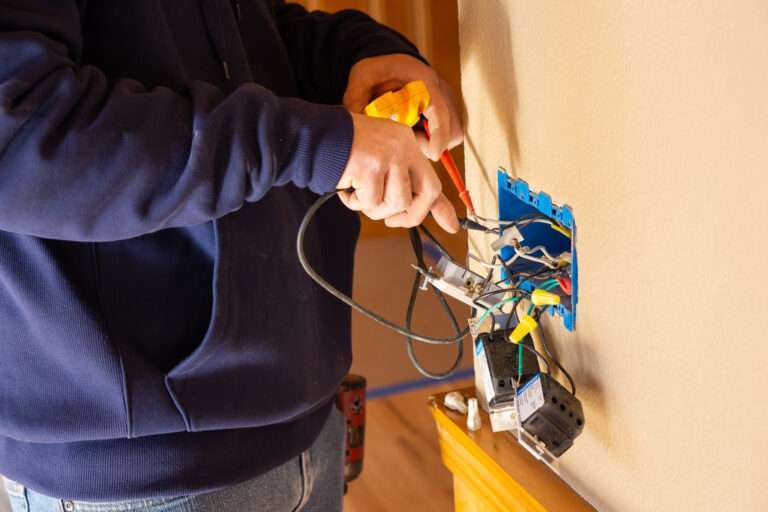
A loose connection in the box. A backstabbed wire, an over-stuffed box, or a wire nut that is not fully seated makes a connection that passes current most of the time. Heat, vibration from a slamming door, or the switch being pushed back into the box can break it momentarily. The switch reboots and reports itself offline.
Mesh and hub coverage gaps. If your switches run on Zigbee, Z-Wave, Thread, or Matter over a hub rather than straight Wi-Fi, the hub’s position and the number of mains-powered repeating devices matter more than the router does.
Firmware and app changes. Sometimes nothing in your house changed. The manufacturer pushed an update, or a cloud service had an outage, and the switch sat offline until it reconnected.
| Symptom | Likely cause | Usually an electrical fix? |
|---|---|---|
| Drops randomly, comes back on its own | Signal strength or channel congestion | No, network side first |
| Offline since install, never stable | No neutral in the box, or wrong wiring | Yes |
| Light flickers faintly when off | No-neutral switch fighting LED bulbs | Yes, often a neutral pull or a different device |
| Only one of a pair of switches works | Mismatched three-way setup | Yes |
| Offline after a door slams or a bump | Loose connection in the box | Yes |
| Several brands of device all offline at once | Router, hub, or cloud outage | No |
| Buzzing, hot-plastic smell, scorch marks | Fault, stop using it | Yes, immediately |
That last row is the one that matters most. If there is a burning or hot-plastic smell, any discoloration or scorch marks around the switch or plate, or buzzing or crackling from the box, stop using that circuit, leave the breaker off, and call a licensed electrician. Do not touch the device to judge how hot it is. Use smell, sight, and sound.
What is safe to check yourself, and what is not
Safe to check yourself, with the power on and nothing opened up:
- Is the router or hub online? Are other devices on the same network working?
- How far is the switch from the router, and how many walls are between them?
- Does the switch recover if you move the router or add a mesh node nearby?
- Does the manufacturer’s app report a firmware update or a cloud outage?
- Did the problem start the day you changed the bulbs? Swapping back to a different LED, or to a dimmable-rated LED, is a fair test.
- Has a breaker tripped? A breaker gets one reset, and if it trips again it stays off and the circuit is inspected. Cycling a breaker repeatedly to revive a switch is not a diagnostic step.
Not safe to do yourself:
- Opening the switch box and working on the conductors inside it.
- Pulling a new neutral wire from the panel or a junction box to a switch location.
- Anything behind a panel cover. Turning the main breaker off does not make a panel safe: the service conductors coming in and the line-side lugs on the main breaker stay energized. A homeowner cannot de-energize those. The utility can, usually by pulling the meter, as can a separate service disconnect if one is fitted ahead of the panel.
- Replacing a switch on a circuit you cannot positively identify.
There is also a permit question. Electrical work in a house is permitted and inspected by your local municipality, and Wisconsin enforces SPS 316, which adopts the 2023 NEC and has been in effect since September 1, 2026. Existing installations do not have to be brought up to the new edition simply because it was adopted, but work you alter or add does have to meet it. If the fix involves new wire, that is licensed work.
Dropping offline in the same room every time?
A licensed electrician separates a wiring fault from a network problem, which look identical from the app.
Licensed master electrician. 12-month workmanship warranty.
When it points to a bigger problem
A smart switch that keeps going offline is sometimes the first symptom of something older in the wall. If the lights on that circuit also keep tripping out, the circuit is the suspect rather than the switch, and where the box has no neutral at all, whether smart switches need one explains the options. Three findings move the job from a device swap to real electrical work.
No neutral anywhere in the switch loop. If the original wiring used a switch loop with only a hot and a switched hot, there is no neutral to borrow. Running one means opening up the path back to the nearest source of a neutral, which may mean a fixture box, a junction, or the panel.
Shared neutrals across circuits. In some older installations a neutral is shared between two circuits. Shared neutrals are still permitted, but the 2023 NEC, which Wisconsin adopted through SPS 316 in September 2026, requires those circuits to be tied so they disconnect together, and older work often predates that. Adding a device that continuously draws from that neutral can make existing problems visible.
Cloth-insulated or knob and tube wiring. If the conductors feeding a switch box are rubber or cloth insulated, or you find knob and tube, a smart switch is not the right thing to install on them. The insulation is often brittle, the boxes are small, and there is no equipment grounding conductor. That is a rewiring conversation, not a smart home one.
Overstuffed boxes. A smart switch is physically deeper than a toggle. Forcing one into a small shallow box crushes conductors and makes exactly the intermittent connection that causes dropouts. The correct fix is a larger box, not more force.
If you are planning more than one or two devices, it is worth getting the infrastructure designed first rather than retrofitting device by device. That is what people mean by smart home wiring: neutrals at every switch location, correctly sized boxes, dedicated circuits where they are needed, hardwired network drops for hubs and access points, and a plan for where the control gear lives. Done up front, it is cheaper and far less fragile than patching.
What an electrician does about it
An electrician starts by separating network problems from wiring problems, because the fixes are completely different.
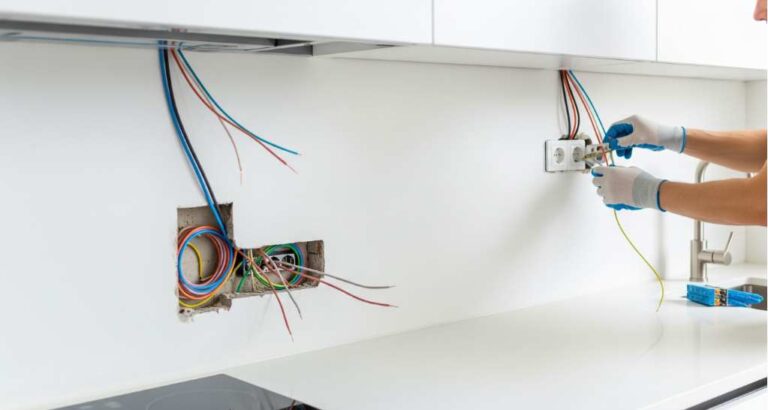
On a service call for a switch that keeps disconnecting, the work usually runs like this. The electrician confirms which circuit feeds the box, de-energizes it, opens the box and inspects the conductors: is there a true neutral, is it a switch loop, are the splices sound, is there an equipment grounding conductor, is the box large enough for the device. Check for signs of heat. Test the circuit under load. If the wiring is sound, measure signal strength at the box itself rather than in the middle of the room, and advise on hub or access point placement. If there is no neutral, price out either pulling one or using a device and dimmer combination that is properly rated for the bulbs in use.
Multi-location switching gets checked as a set, not one switch at a time, because a three-way or four-way arrangement only behaves if every part of it matches. Dimmer and bulb compatibility gets checked too. Many “offline” complaints about smart lighting turn out to be a dimmer and LED mismatch that reads as flicker and dropouts.
The same diagnostic logic applies to other smart or high-draw equipment in the house. If a breaker rather than a network connection is the thing that keeps letting go, the reasoning behind a charger that trips repeatedly follows a similar path from load to wiring to device.
Lehmann Electrical & Design is led by master electrician Jacob Lehmann and works across Milwaukee and Waukesha County. The company holds an A+ rating with the BBB and 4.9 stars on Google, and workmanship is covered by a 12-month warranty.
If your smart switches keep dropping off and you would rather know whether it is the wall or the Wi-Fi, ask us about a smart home wiring visit or call 414-207-0109.
Why homeowners call Lehmann Electrical & Design
- Led by licensed master electrician Jacob Lehmann
- A+ rating with the BBB and 4.9 stars on Google
- 12-month workmanship warranty on the work we do
- Permits pulled and inspections scheduled as part of the job
- Milwaukee, Wauwatosa and Waukesha County, from 12012 W Fairview Ave, Wauwatosa
Ready to have the circuit checked?
Tell us which switch, which room, and how often it drops.
Licensed master electrician. 12-month workmanship warranty.
Frequently asked questions
▾Why does my smart switch keep disconnecting but my phone has full signal?
Your phone is in the open air in the middle of the room. The switch is inside a wall box, often behind a metal plate and plaster, on an outside wall. Signal at the box can be far weaker than signal where you are standing. Most smart switches also use the 2.4 GHz band only, which is more crowded than 5 GHz, so congestion from neighboring networks adds to the problem.
▾Why is my smart switch taking so long to respond?
Lag usually comes from the path a command takes, not the switch. If the command goes from your phone to a cloud server and back, any internet slowdown shows up as delay. Local control through a hub is faster. Delay can also mean the switch is at the edge of usable signal and is retrying. A switch running without a proper neutral may also be slow and unreliable.
▾What is smart home wiring?
Smart home wiring is the physical groundwork that makes smart devices reliable: a neutral conductor at every switch location, boxes deep enough for the devices, dedicated circuits where loads need them, and wired network runs for hubs and access points. It is the difference between devices that happen to work and a system that holds together. It is licensed electrical work, permitted and inspected by your municipality under Wisconsin SPS 316.
▾Can I just install a no-neutral smart switch instead of running a wire?
Sometimes. No-neutral switches pass a very small current through the light fixture to power themselves, which works best with incandescent or certain compatible LED loads. With low-draw LEDs you often get faint glow when off, flicker, or repeated dropouts. If the switch has to be dependable, pulling a real neutral is the more durable answer, and that is work for a licensed electrician.
Next step
Get the switch checked
Tell us which room and how often it drops.
Licensed master electrician12‑month warranty4.9 on Google
Milwaukee, Wauwatosa and Waukesha County. Prefer to talk? Call 414-207-0109